

Popular Games
Last Played


Shoe Designer
1 plays






































Shoe Designer
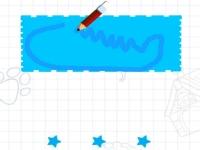
Get creative with Shoe Designer, a fun 2D games title where you craft stylish footwear. This hypercasual games experience lets you mix colors, patterns, and materials to build your perfect pair. Whether you love fashion or just enjoy designing, this game offers endless customization options. Try different shapes, fabrics, and details to make shoes that stand out.
How To Play Shoe Designer
Start by picking a shoe shape, then clean it up. Next, dive into customization by choosing colors, patterns, and materials. Add embellishments to make your design unique. The simple controls make it easy to experiment with different styles until you find the perfect look.
Controls and Features
Use your mouse to drag and drop materials onto the shoe. Click to select colors and patterns from the available options. The game is designed for easy navigation, letting you focus on creativity. Test out combinations to see how they look before finalizing your design.
Tips
Take your time when picking colors. Experiment with different materials to see how they change the shoe’s appearance. The drag-and-drop feature makes it simple to mix and match elements until you’re happy with the result.
FAQ
What is Shoe Designer about?
Shoe Designer is a 2D games where players design and customize shoes with various colors, patterns, and materials. The goal is to create stylish footwear using the game’s drag-and-drop tools.
Are there any timers in Shoe Designer?
There are no timers in Shoe Designer. Players can take as much time as they need to perfect their shoe designs at their own pace.
Can I save my shoe designs in Shoe Designer?
Yes, the objective of Shoe Designer is to customize and save your shoe designs. You can experiment with different styles and keep your favorite creations.
How do I change materials in Shoe Designer?
Use the mouse to drag and drop materials onto the shoe. Click to select colors and patterns to apply to your design. The controls are simple and intuitive for easy customization.
```About this game
- Supported devices
- Desktop
- Genre
- Hypercasual Games
- Release date
- 24 October 2024
- Latest update
- 24 October 2024
- Rating
- No ratings yet